
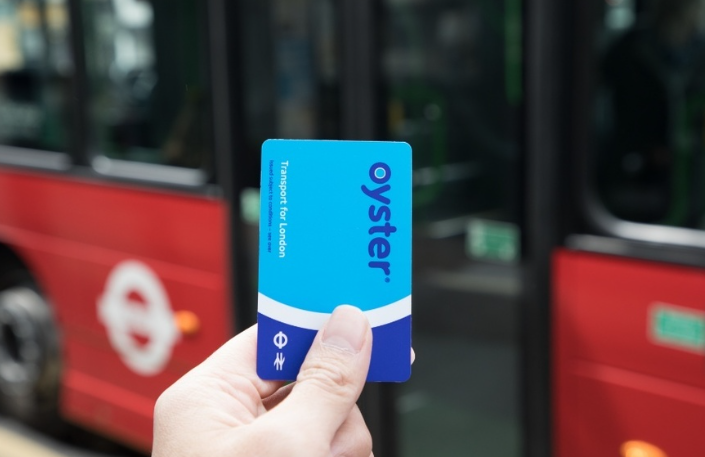
Overview
Yes, you can top up your Oyster card on the go using the TfL Go app. Simply make your payment in the app, and after about 30 minutes, you can collect your top-up by touching your card on any yellow card reader across London’s transport network.
Here are the most convenient ways to keep your Oyster topped up while moving around the city:
- TfL Go App: Download the free app for Apple and Android devices to check your balance, set up low balance alerts, and purchase pay as you go credit or Travelcards.
- Auto Top-Up: Configure your account to automatically add money whenever your balance drops below a certain amount.
- Oyster Ticket Stops: Visit one of more than 4,000 authorised shops and newsagents to add credit to your card.
- Contactless Payments: Use your bank card, Apple Pay, or mobile device directly on the yellow card readers and enjoy the same adult fare caps.
Whether you’re commuting daily or visiting London occasionally, managing your travel balance has become easier than ever.
Introduction
I still remember the days when topping up an Oyster card meant searching for a ticket machine or standing in line at a station. If you forgot to add credit before travelling, it could become frustrating, especially during busy rush hours.
Fortunately, things have changed.
Transport for London (TfL) has made managing travel much more convenient. Thanks to the TfL Go app, Oyster card users can now top up their cards on the go, check balances, view journey history, and receive helpful low balance notifications directly on their smartphones.
In my experience, this digital approach saves time and removes much of the stress that comes with running out of credit unexpectedly.
This guide explains everything you need to know about topping up your Oyster card using your phone and explores several alternative ways to stay travel-ready throughout London.
Why the TfL Go App Changed the Way Londoners Travel
The introduction of the TfL Go app marked a major step forward in London’s smart ticketing system.
Designed by Transport for London and originally developed with the help of Cubic Transportation Systems, the app provides a simple and efficient way for travellers to manage their Oyster cards without needing to visit a ticket office.
See More: Minister to Open Recruitment Disability Conference in London
The app is available free of charge for:
- Apple devices through the Apple App Store
- Android devices through Google Play Store
With just a few taps, users can:
- Add pay as you go credit.
- Purchase Travelcards.
- Check their remaining balance.
- Review recent journeys.
- Receive low balance alerts.
- Manage travel more efficiently.
How to Top Up Your Oyster Card on the Go
One thing I appreciate most is how straightforward the process has become.
Step 1: Download the TfL Go App
Install the free app on your smartphone and sign in to your TfL account.
Step 2: Add Your Oyster Card
Register your Oyster card within the app so that you can manage your balance digitally.
Step 3: Purchase Credit or Travelcards
You can buy:
- Pay as you go credit
- Weekly Travelcards
- Monthly Travelcards
- Other eligible passes
Step 4: Wait Around 30 Minutes
Once the payment is complete, the credit becomes available in approximately half an hour.
Step 5: Collect the Top-Up
Touch your Oyster card on a yellow card reader located at:
- Tube stations
- Rail stations
- Tram stops
- River Bus piers
The balance will update automatically during your journey.
Collecting Your Top-Up Across London’s Transport Network
One feature that makes the system particularly convenient is the widespread availability of yellow card readers.
They are found throughout London’s transport network, making it easy to collect your credit wherever your journey begins.
These locations include:
- London Underground stations
- National Rail stations
- Tram stops
- River Bus piers
- Bus routes across London
With thousands of access points available, collecting your top-up rarely requires extra effort.
Check Your Oyster Card Balance Anytime
Before smartphone apps became common, many travellers had no idea how much credit remained until they touched in.
The TfL Go app solves that problem.
Users can instantly:
- View their current pay as you go balance.
- Monitor spending.
- Avoid unexpected interruptions.
- Prepare for upcoming journeys.
In my experience, regularly checking the balance through the app prevents those unpleasant surprises during morning commutes.
View Eight Weeks of Journey History
Another useful feature is access to recent travel records.
The app allows customers to review the previous eight weeks of journey history.
This can be helpful for:
- Tracking commuting costs.
- Checking travel patterns.
- Reviewing fares.
- Identifying incomplete journeys.
- Managing expense claims.
For regular commuters, this information provides a much clearer picture of monthly transport spending.
Low Balance Alerts Help Avoid Travel Disruptions
One of my favourite features is the low balance alert.
Instead of discovering that your credit is almost gone while rushing for a train, the app notifies you beforehand.
Benefits include:
- Better travel planning.
- Fewer interrupted journeys.
- Greater peace of mind.
- Faster top-ups.
This small feature can make a huge difference for people who rely on London’s transport system every day.
Set Up Auto Top-Up for Maximum Convenience
For frequent travellers, Auto Top-Up can be even more useful.
The service automatically adds money when your balance falls below a preset amount.
For example:
- Add £20 automatically.
- Add £40 automatically.
- Trigger the recharge when the balance drops below £5.
Advantages include:
- No need to remember manual top-ups.
- Continuous travel without interruption.
- Reduced risk of insufficient credit.
Many regular commuters consider Auto Top-Up one of the most valuable features offered by TfL.
More Than 4,000 Oyster Ticket Stops Across London
Although mobile technology is incredibly convenient, some people still prefer physical locations.
TfL works with more than 4,000 authorised Oyster Ticket Stops, including local shops and newsagents.
These outlets allow customers to:
- Add credit.
- Purchase Travelcards.
- Manage travel without using the app.
This option is especially useful when internet access is unavailable.
Contactless Payments: An Alternative to Oyster Cards
Over the years, many London travellers have shifted to contactless payment methods.
Instead of topping up an Oyster card, you can simply use:
- Debit cards
- Credit cards
- Apple Pay
- Mobile wallets
- Contactless devices
Touch your card or phone on the same yellow card readers and you’ll pay the same adult fares while benefiting from daily and weekly caps.
For visitors or occasional travellers, this can be a very convenient solution.
Future Improvements and Refund Features
TfL continues to improve its digital services.
Additional functionality has included and expanded features such as:
- Easier account management.
- Better notifications.
- More travel information.
- Support across London’s extensive bus network.
- Refund options for incomplete journeys.
These improvements show how London’s transport system continues to embrace smart technology and customer convenience.
Practical Tips for Oyster Card Users
After researching and testing various methods, here are a few tips I would recommend:
Keep Notifications Enabled
Low balance alerts can prevent inconvenient situations.
Register Your Card
Having your card linked to your TfL account provides easier access to journey history and account management.
Consider Auto Top-Up
Frequent commuters can save time and avoid disruptions.
Use Contactless for Occasional Travel
Visitors and infrequent travellers may find contactless payments simpler than maintaining an Oyster card.
Review Your Journey History
Checking previous trips can help spot incorrect charges and manage expenses more effectively.
Frequently Asked Questions
Can I top up my Oyster card using my phone?
Yes. The TfL Go app allows you to add pay as you go credit and Travelcards directly from your smartphone.
How long does an Oyster card top-up take?
Typically, top-ups become available after around 30 minutes.
Where do I collect my top-up?
Simply touch your card on any yellow card reader at Tube stations, rail stations, tram stops, River Bus piers, or buses.
Can I check my balance online?
Yes. The TfL Go app makes balance checks quick and convenient.
Does the app show journey history?
Yes. You can view the previous eight weeks of journeys.
Is contactless cheaper than Oyster?
No. Contactless payments charge the same adult fares and provide the same daily and weekly caps.
Conclusion
Managing travel in London has become much easier thanks to the TfL Go app and the continued evolution of smart ticketing.
In my experience, being able to top up an Oyster card on the go, check balances instantly, receive low balance alerts, and review journey history makes daily commuting far more convenient.
Whether you prefer mobile top-ups, Auto Top-Up, Oyster Ticket Stops, or simply using contactless payments, London offers several flexible ways to stay connected to its transport network.
The days of worrying about running out of credit halfway through a journey are largely behind us. With a few taps on your phone, your next trip is always within reach.